Tag: Technology

All things related to technology, its use, tutorials, commentary, etc…

  • BakeOff: Why you need enterprise standards for AI compared across 4x different tools

    BakeOff: Why you need enterprise standards for AI compared across 4x different tools

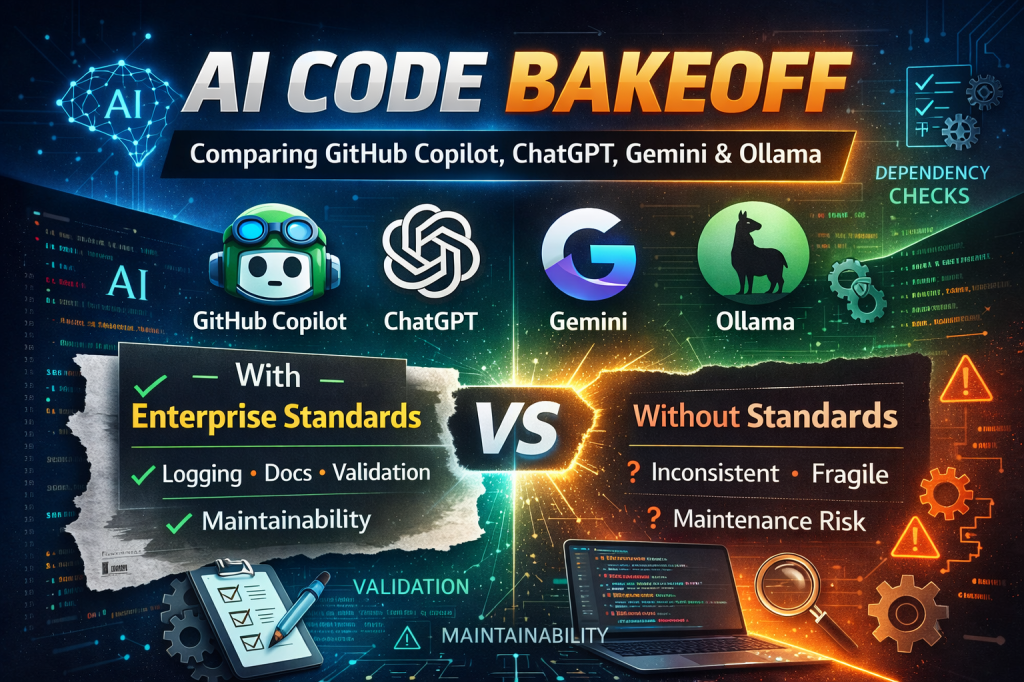
    It’s no secret that everybody is using AI to vibe code; but what does the code look like when it’s outputted and is it maintainable? I gave Github Copilot, Gemini, ChatGPT, and Ollama a pet project to code up but with a twist! I wrote a simple enterprise standards for how to write the script and had them code with & without the standards for a total of 8 codebases 🙂

    The project:

    This was simple; I asked it to code up a podcast downloader that can download a weeks worth of podcasts. This was a trivial “hello world” type script given that podcasts can be downloaded via the `npx podcast-dl` command with args for a before & after date. To define the project I made a readme & explained the format for the CSV listing podcasts & how to download one of them.

    Results:

    All of the GenAI tools were able to code up the simple project but some were better than others. Something I noticed is that they all had trouble with dates; whether or not I piped in the enterprise standards. 
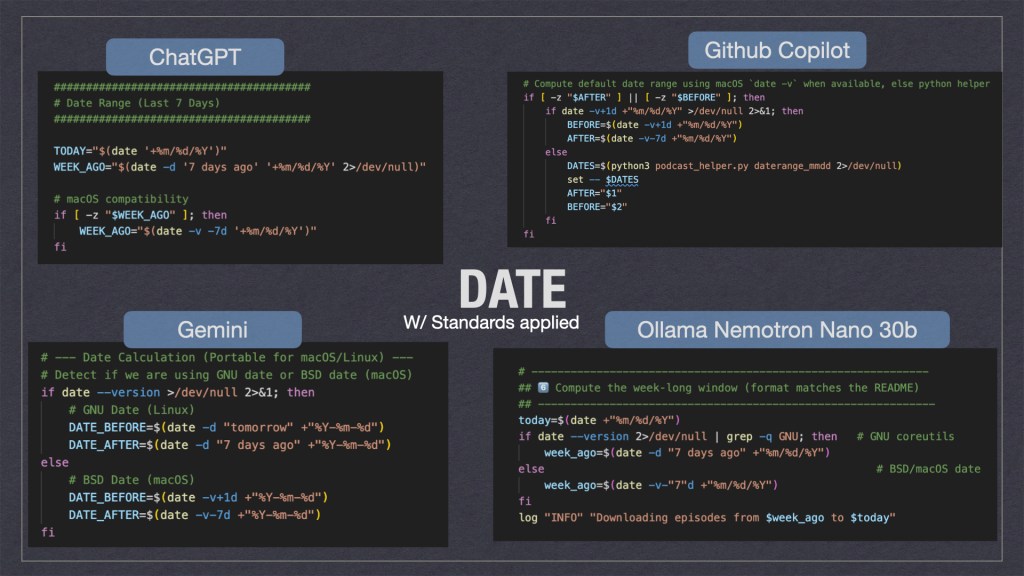
    As we can see above the gen-ai tooling took multiple solution approaches. Personally I think ChatGPT’s where it would try to fix the date if it was missing was the cleanest. Ollama’s solution where it used multiple for loops wasn’t the cleanest but I feel it would be the most durable when ported to different systems. 

    Ollama isn’t perfect though. In my enterprise standards spec I told the AI’s to include remote logging to a HEC[http endpoint collector]. Instead of using curl to POST the log it just wrote it to STD_OUT … which defeated the purpose and was ultimately a hallucination. This might be a future area of exploration for enterprises; i.e. “when should I use a cheap local model vs remote ones?” Also “How do I prevent AI hallucinations from making it to prod?”

    Why Use the Enterprise Standards:

    With the enterprise standards applied I noticed a increase in quality across the board; all the scripts had help documentation associated as well as all checked that their external dependencies were present. In addition I noticed emergent behaviors as well; such as some of the AI tooling [ChatGPT + Copilot] added arg validation logic without being prompted 🙂 ‘Emergent behaviors’ was a nice surprise. By providing a standard, I wasn’t just giving the AI a ‘to-do’ list; I was giving it context. When ChatGPT and Copilot added argument validation without being asked, it proved that structured constraints actually unlock better reasoning in LLMs.

    Many users will design a spec for their projects but many might not be aware they should also take care how the code is written & not just spit out a POC. 

    Sources:

    Want to make your own? You can copy the code output from GitHub or the project spec’s.

    Enterprise Standards.md:

    This file documents enterprise standards that are best practice on coding projects.
    # Bash/Shell Scripts
    ## Self documenting / help text
    Bash scripts should have documentation embedded in them. The term "bash script" is analagous to any shell script such as ZSH and DASH.
    For example:
    ```sh
    #!/bin/sh
    ## Script
    ## - A script that does a thing
    ##
    ## $1 - the first arg that is for a thing
    ## $2 - the second arg that does a thing
    if [ "$1" == "--help" ];then
    cat $0 | grep "##" | tr -d "#"
    exit 0
    fi
    # A regular comment, that isn't in the help
    echo "Hello World"
    ```
    As we can see there are several "features" in the hello world above:
    - Comments with ## are included in the help text
    - The script is able to read its own contents and print the help text
    - Regular comments with a single `#` aren't included in the help text
    - A basic description of what the script does is in the help text
    - A basic description of what the args do is in the help text; if the script uses positional args
    ## Dependency aware
    shell scripts should be aware when they are using non-standard programs & check that they are installed on the host machine. For example:
    ```sh
    #!/bin/sh
    hasProgram () {
    command -v "$1" >/dev/null 2>&1
    HAS_PROGRAM="$?"
    if [ $HAS_PROGRAM -ne 0 ]; then
    echo "Error: $1 is not installed."
    exit 1
    fi
    }
    hasProgram "python3"
    hasProgram "jq"
    hasProgram "this_program_is_not_installed"
    ```
    This has a couple of features:
    - hasProgram is extracted to a function; many unix like environments have a program like `require` but this isn't present on many machines so it's often necessary to include a function
    - Commands like jq are useful but may not be installed on everyones machine; if the script tried to use jq when it's not installed the behavior may be undesired
    - Commands that aren't installed like `this_program_is_not_installed` used as a reference example will cause the script to exit and return an error
    ## Logging
    Scripts should implement logging. Logging may go to a remote HEC like splunk, a local HEC like fluent bit, or be unconfigured.
    An example logging payload could look like:
    ```json
    {"event": "Hello, world!", "level": "INFO", "status: "success", "sourcetype": "script", "time": "28/Sep/2016:09:05:26.917 -0700"}
    ```
    The same log written to STD_OUT could look like:
    ```txt
    [INFO] [status=success] [28/Sep/2016:09:05:26.917 -0700] -- Hello, world!
    ```
    The timezone should be the timezone of the machine it's running on.
    Also for items that fail the status should be failure.
    Remote logging should be configured via the ENV var `HEC_REMOTE_LOG`. The use of this
    env var should be documented in the scripts help text. If this var is unset or empty then it should be assumed that remote logging is disabled. Logs should always be logged to STD_OUT even when remote logging is enabled or not.

    ReadMe-PodcastDownloader.md

    # Podcast Downloader
    A simple application to download multiple podcasts from a CSV file. For each podcast assume we want a weaks worth of them.
    ## Example:
    I've been using this to download podcasts:
    ```
    npx podcast-dl --include-meta --include-episode-meta --include-episode-transcripts --include-episode-images --before 12/31/2016 --after 01/01/2016 --file hello.rss.xml
    ```
    the args `--before 12/31/2016 --after 01/01/2016` indicate the timespan to download them. You can re-write these to be a week's worth from today's date.
    ## Podcast file
    Podcasts are distributed via xml files hosted on a webserver somewhere. With a given feed URL you should download it via:
    ```
    curl -L -o hello.rss.xml https://example.com/hello.feed
    ```
    Note: Curl should have the params to follow redirects like -L so empty files aren't produced.
    ## CSV format
    The bash script will be given a CSV with a header row. The header can be assumed to always be in the same order.
    ```txt
    Folder,URL,Feed URL
    audiopodcast-hello,https://example.com/hello,https://example.com/hello.feed
    videopodcast-hello,https://example.com/hello,https://example.com/hello-video.feed
    ```

    testcase1.csv

    Folder,URL,Feed URL
    audiopodcast-business-shrm,https://podcasts.apple.com/us/podcast/shrm-all-things-work/id1450310325,https://feeds.megaphone.fm/shrm-all-things-work
    audiopodcast-wex-benefitsbuzz,https://podcasts.apple.com/us/podcast/benefits-buzz/id1470308336,https://anchor.fm/s/3f8be798/podcast/rss
    audiopodcast-tyler-tylertech,https://podcasts.apple.com/us/podcast/tyler-tech-podcast/id1513971247,https://feeds.simplecast.com/Ow3Phn_H
    audiopodcast-jre,https://podcasts.apple.com/us/podcast/the-joe-rogan-experience/id360084272,https://feeds.megaphone.fm/GLT1412515089

    Or go to github at: https://github.com/adamclark2/2026-03-GenAIBakeoff

    You might also want to look at the linkedin post https://www.linkedin.com/feed/update/urn:li:activity:7434227768873103360/?originTrackingId=9KwZ2ewpGLsmnDQHyI7NSQ%3D%3D

  • First Malicious MCP and Mitigation’s

    First Malicious MCP and Mitigation’s

    As you may have heard: the first malicious MCP[Model Context Protocol] was found in the wild [link + archived of coursex2 ]. While many articles tout this not a ton go over mitigation strategies. The good news is that many “traditional” security control mechanisms could help. Thinking off the top of my head I can think of a couple:

    Preempting issue beforehand:

    Unfortunately hindsight can be 20/20 but there are things you can do before hand to try to preempt these issues such as:

    – Administrative Controls: Risk assessment
    – Artifact management
    – SCA [software composition analysis] or BOM [bill of materials]
    – Dependency pinning

    Many developers feel slowed down by needing to go to yet another review-board but these provide the valuable opportunity to ask basic questions like “Does this tool log to our enterprise logging solution?” and others. Going through the rigmarole can help ensure everyone is security/architecture minded and has a good guidance to mitigate risks [or at-least implement controls to remediate afterwords].

    In addition artifact management tools [like artifactory, sonatype,… others] could also help by preventing developers from pulling unknown artifacts from the web during build time. Unfortunately this has the perception of slowing down developers and doesn’t work for artifacts pulled outside of your enterprise solution.

    Also there are tools within the artifact management domain such as SCA and BOM to be able to identify artifacts and where they’re used etc… This might be something for you to look into as well.

    Another thing to consider [which may or may not have helped in this case] is dependency pinning. Instead of automatically upgrading dependencies you might want to have them stay at a particular version or (current -1). Unfortunately this approach has the gap of needing developers to manually update dependencies which can get laborious.

    Preempting In-flight:

    While a request is traveling over the wire there might be ways to preempt/prevent this as a technical compensating control. i.e.:

    -Least Privilege: MTA deny BCC functionality / deny-list

    Least privilege is a common security tenant: i.e. give the application[or thing..] the lest amount of privileges needed to do it’s job. Let’s say your app doesn’t use BCC consider seeing if it’s possible to turn it off & log+alert when it’s being used. While I’m not sure if it’s possible for the MCP issue at hand it’s a good thing to consider in general.

    Detection/After/Remediation

    Unfortunately in the real world these things happen being able to identify and remediate the issue is paramount. Here are some things I can think of:

    -Logging: Service itself or DPI
    -Artifact management w/ logging
    -MCP registry

    Logging is one of the common ways of looking for issues. If you have the logs from either the service itself or DPI[Deep packet inspection] you could probably look through those using a log analyzer [like splunk, sumologic, cloudwatch etc..] to identify patterns of malicious activity [i.e. emails BCC’d to `phan@giftshop [dot] club` ]. Unfortunately people might not have logging setup correctly or truncate the logs in a small time period. Also some tools make setting up logs difficult and may need work arounds such as using webhooks or custom coding a lambda/chron job to get them from point A to B.

    In addition you may want to play “who done it” i.e.: identify teams using bad dependencies and tap them on the shoulder to fix it. One way of doing that is via your artifact management solution [like artifactory, sonatype,… others]. If you have logging setup you could try to pull a report saying X “users” are pulling the bad artifact [although mapping that machine-to-machine service account to a git repo might be another story]. Also another gap is not everybody in your org might be using the artifact solution to pull artifacts. In such as case you may want to “fall back” to using logs from a egress gateway/DPI/network monitoring solution [i.e. palo alto, corelight zeek, squid proxy etc…] for which artifacts are being pulled where; although mapping IPs to human owners can be difficult.

    Another things too is the emergence of MCP registries. As this technology becomes more popular and utilized in the enterprise setting it may help identify who is using which MCP servers as well as decrease time to market by cataloging known good MCP servers.

    As we can see there are many ways using traditional security controls can help. As a bit of a disclaimer though your mileage may vary 🙂

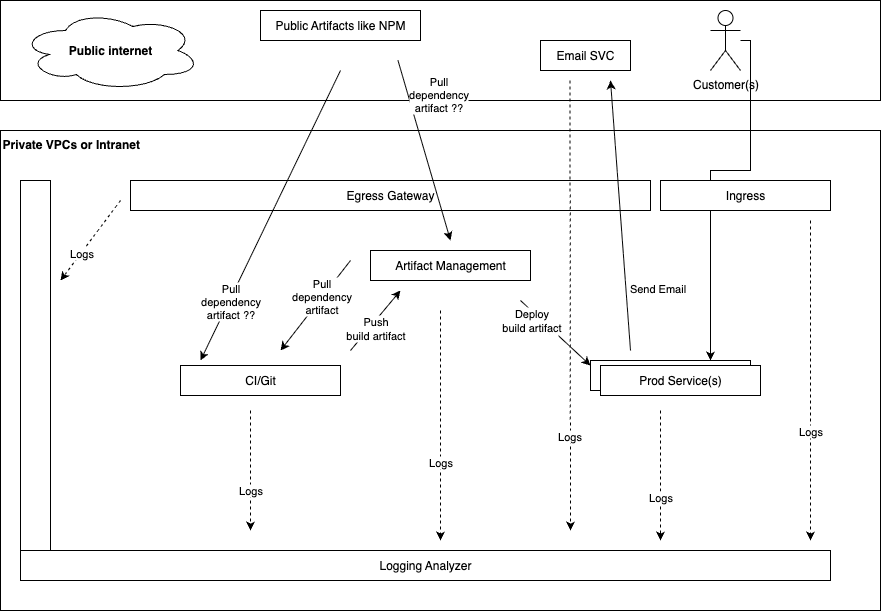
    Here’s a diagram of what a typical enterprise setup could look like:

    A technical architecture diagram illustrating a secure enterprise environment, showing how public artifacts like NPM interact with private VPCs, CI/Git, Artifact Management, Egress/Ingress, Prod Services, Email SVC, Customers, and a Logging Analyzer, with dashed lines indicating logging pathways.

    Works Cited:

    Most of this article was based off my industry experience as a IT engineer.

    Original article from https://www.koi.security/blog/postmark-mcp-npm-malicious-backdoor-email-theft | Archived | X2

    infosecurity-magazine article https://www.infosecurity-magazine.com/news/malicious-ai-agent-server/ | Archived | X2

    FYI the thumbnail for this article was generated by generative-ai technologies namely my personal account for google Gemini. Thanks Gemini!

  • Things to do when getting a new domain

    1. Helpful links
    2. Host a website
      1. WordPress.com Hosting
      2. Don’t forget to configure your WordPress
      3. Alternatives to consider
    3. Get access to webmaster tools
      1. Google
      2. Bing
      3. Other Webmaster tools
    4. Get access to analytics tools
      1. Google Analytics
      2. Cloudflare Analytics
      3. Microsoft Clarity Analytics
    5. Create a route53 public hosted zone
    6. FOOTNOTES:

    As you may have noticed I got a new domain(s) adamclark.me and adamjamesclark.com .
    When I got the new domains there are a couple of things I’ve done & I wanted to catalog them here.

    As a matter of transparency, you can google most of these things 🙂 having them in one place does provide value to me though.

    Here are some links to other content I found useful. Do your own research though & don’t trust everything on the internet 😉
    https://dnschecker.org/
    https://wordpress.com/support/sitemaps/
    https://wordpress.com/support/markdown-quick-reference/

    Host a website

    Just buying the domain doesn’t create a website, so you’ll need to do that yourself or get hosting.

    WordPress.com Hosting

    I’ve chosen to do wordpress.com for my hosting.

    Some things I like are:

    • Fairly inexpensive
    • Easy to export from the admin console
    • WYSIWYG[^2] editing, I don’t need to make a PR[^3] then publish a static site

    Some things I don’t like are:

    • Editor is obtuse and harder to use than it should be, this could just be me needing to get used to it though

    Don’t forget to configure your WordPress

    • Make the site private before you’re ready to publish it
    • Add tags & categories in the wp-admin section
    • Add a link to the RSS feed & sitemap to the homepage so it’s handy for search engines to find

    Alternatives to consider

    While you could use wordpress.com to host a site there are other ways too:

    • Create a static HTML page & put it in a s3 bucket
    • Create a github action to add pages to a s3 bucket on a PR
    • Other hosting providers such as wix, squarespace
    • Other wordpress/drupal/joomla hosting providers etc….

    Get access to webmaster tools

    These go by various names such as search console etc… the functionality is similar though: being able to gain insight how search engines see your website and be able to make changes to get it to rank better in search.

    Google

    Getting access to this is simple, I used their DNS validation to create a TXT record. FYI you’ll need to create the text record at the domain level such that:

    host=@
    value=google-site-verification=*************_*_*******************************
    type=TXT
    ttl=15min
    

    FYI I used a short TTL incase I fat-fingered copying the value, but once it’s working consider using a higher TTL.
    I also masked the token in this example so nobody accidentally copy-pastes it because it only works for my domain 🙂

    Bing

    Getting access to this is simple, I used their DNS validation to create a CNAME record. Bing had me create a random subdomain with the value verify.bing.com.

    host=*********************************.adamclark.me
    value=verify.bing.com
    type=TXT
    ttl=15min
    

    FYI I used a short TTL incase I fat-fingered copying the value, but once it’s working consider using a higher TTL.
    I also masked the token in this example so nobody accidentally copy-pastes it because it only works for my domain 🙂

    Other Webmaster tools

    It seems like everybody is making webmaster tools now a days. Facebook, Pinterest, and Yandex also have tools.
    While I didn’t enable these they are options.

    Get access to analytics tools

    Getting access to these tools is similar to the webmaster tools, I used the DNS based methods to add my site.

    Google Analytics

    Cloudflare Analytics

    Microsoft Clarity Analytics

    Create a route53 public hosted zone

    I have a personal AWS[^1] account for hosting pet-projects and POC/POT’s[^4] for personal use. So far I haven’t used a domain but I added my new domains to route 53 so I can easily access/edit DNS in route53.

    1. Create the public hosted zone in AWS
    2. Copy the NS records it generated in the new public zone & copy-paste to your registrar
    3. Validate via nslookup

    FOOTNOTES:


    [^1]: AWS stands for Amazon Web Services
    [^2]: WYSIWYG is an acronym for what you see is what you get
    [^3]: PR is a acronym for pull request, a request to “pull” code from one branch to another, typically used when working in github source control.
    [^4]: POC: Proof of concept, validating a conscept works, typically slightly bigger scale than a POT
    [^5]: POT: Proof of technology, validating a individual/small scale use-case works in a given technology