It’s no secret that everybody is using AI to vibe code; but what does the code look like when it’s outputted and is it maintainable? I gave Github Copilot, Gemini, ChatGPT, and Ollama a pet project to code up but with a twist! I wrote a simple enterprise standards for how to write the script and had them code with & without the standards for a total of 8 codebases 🙂
The project:
This was simple; I asked it to code up a podcast downloader that can download a weeks worth of podcasts. This was a trivial “hello world” type script given that podcasts can be downloaded via the `npx podcast-dl` command with args for a before & after date. To define the project I made a readme & explained the format for the CSV listing podcasts & how to download one of them.
Results:
All of the GenAI tools were able to code up the simple project but some were better than others. Something I noticed is that they all had trouble with dates; whether or not I piped in the enterprise standards.
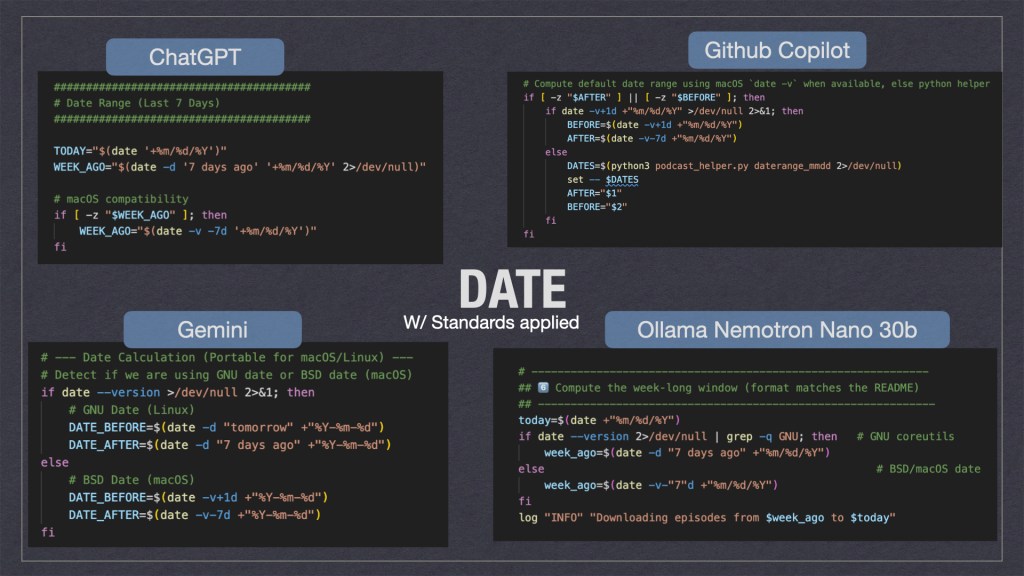
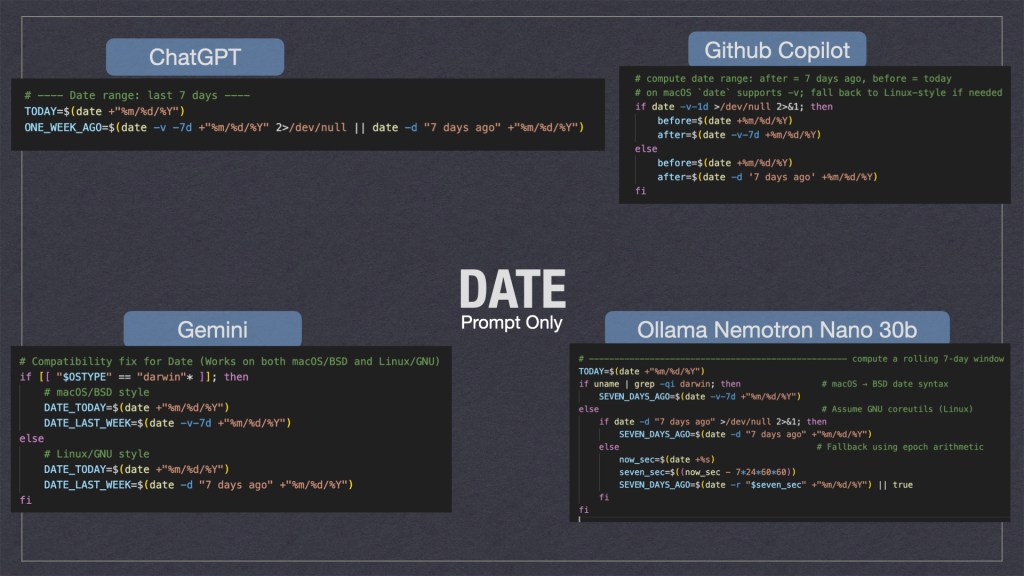
As we can see above the gen-ai tooling took multiple solution approaches. Personally I think ChatGPT’s where it would try to fix the date if it was missing was the cleanest. Ollama’s solution where it used multiple for loops wasn’t the cleanest but I feel it would be the most durable when ported to different systems.
Ollama isn’t perfect though. In my enterprise standards spec I told the AI’s to include remote logging to a HEC[http endpoint collector]. Instead of using curl to POST the log it just wrote it to STD_OUT … which defeated the purpose and was ultimately a hallucination. This might be a future area of exploration for enterprises; i.e. “when should I use a cheap local model vs remote ones?” Also “How do I prevent AI hallucinations from making it to prod?”
Why Use the Enterprise Standards:
With the enterprise standards applied I noticed a increase in quality across the board; all the scripts had help documentation associated as well as all checked that their external dependencies were present. In addition I noticed emergent behaviors as well; such as some of the AI tooling [ChatGPT + Copilot] added arg validation logic without being prompted 🙂 ‘Emergent behaviors’ was a nice surprise. By providing a standard, I wasn’t just giving the AI a ‘to-do’ list; I was giving it context. When ChatGPT and Copilot added argument validation without being asked, it proved that structured constraints actually unlock better reasoning in LLMs.
Many users will design a spec for their projects but many might not be aware they should also take care how the code is written & not just spit out a POC.
Sources:
Want to make your own? You can copy the code output from GitHub or the project spec’s.
Enterprise Standards.md:
This file documents enterprise standards that are best practice on coding projects. # Bash/Shell Scripts## Self documenting / help textBash scripts should have documentation embedded in them. The term "bash script" is analagous to any shell script such as ZSH and DASH. For example:```sh#!/bin/sh## Script## - A script that does a thing## ## $1 - the first arg that is for a thing## $2 - the second arg that does a thingif [ "$1" == "--help" ];then cat $0 | grep "##" | tr -d "#" exit 0fi# A regular comment, that isn't in the helpecho "Hello World"``` As we can see there are several "features" in the hello world above:- Comments with ## are included in the help text- The script is able to read its own contents and print the help text- Regular comments with a single `#` aren't included in the help text- A basic description of what the script does is in the help text- A basic description of what the args do is in the help text; if the script uses positional args## Dependency awareshell scripts should be aware when they are using non-standard programs & check that they are installed on the host machine. For example:```sh#!/bin/shhasProgram () { command -v "$1" >/dev/null 2>&1 HAS_PROGRAM="$?" if [ $HAS_PROGRAM -ne 0 ]; then echo "Error: $1 is not installed." exit 1 fi}hasProgram "python3"hasProgram "jq"hasProgram "this_program_is_not_installed"```This has a couple of features:- hasProgram is extracted to a function; many unix like environments have a program like `require` but this isn't present on many machines so it's often necessary to include a function- Commands like jq are useful but may not be installed on everyones machine; if the script tried to use jq when it's not installed the behavior may be undesired- Commands that aren't installed like `this_program_is_not_installed` used as a reference example will cause the script to exit and return an error## LoggingScripts should implement logging. Logging may go to a remote HEC like splunk, a local HEC like fluent bit, or be unconfigured. An example logging payload could look like:```json{"event": "Hello, world!", "level": "INFO", "status: "success", "sourcetype": "script", "time": "28/Sep/2016:09:05:26.917 -0700"}```The same log written to STD_OUT could look like:```txt[INFO] [status=success] [28/Sep/2016:09:05:26.917 -0700] -- Hello, world!```The timezone should be the timezone of the machine it's running on. Also for items that fail the status should be failure. Remote logging should be configured via the ENV var `HEC_REMOTE_LOG`. The use of thisenv var should be documented in the scripts help text. If this var is unset or empty then it should be assumed that remote logging is disabled. Logs should always be logged to STD_OUT even when remote logging is enabled or not. ReadMe-PodcastDownloader.md
# Podcast DownloaderA simple application to download multiple podcasts from a CSV file. For each podcast assume we want a weaks worth of them. ## Example:I've been using this to download podcasts:```npx podcast-dl --include-meta --include-episode-meta --include-episode-transcripts --include-episode-images --before 12/31/2016 --after 01/01/2016 --file hello.rss.xml```the args `--before 12/31/2016 --after 01/01/2016` indicate the timespan to download them. You can re-write these to be a week's worth from today's date. ## Podcast filePodcasts are distributed via xml files hosted on a webserver somewhere. With a given feed URL you should download it via:```curl -L -o hello.rss.xml https://example.com/hello.feed```Note: Curl should have the params to follow redirects like -L so empty files aren't produced.## CSV formatThe bash script will be given a CSV with a header row. The header can be assumed to always be in the same order. ```txtFolder,URL,Feed URLaudiopodcast-hello,https://example.com/hello,https://example.com/hello.feedvideopodcast-hello,https://example.com/hello,https://example.com/hello-video.feed```testcase1.csv
Folder,URL,Feed URLaudiopodcast-business-shrm,https://podcasts.apple.com/us/podcast/shrm-all-things-work/id1450310325,https://feeds.megaphone.fm/shrm-all-things-workaudiopodcast-wex-benefitsbuzz,https://podcasts.apple.com/us/podcast/benefits-buzz/id1470308336,https://anchor.fm/s/3f8be798/podcast/rssaudiopodcast-tyler-tylertech,https://podcasts.apple.com/us/podcast/tyler-tech-podcast/id1513971247,https://feeds.simplecast.com/Ow3Phn_Haudiopodcast-jre,https://podcasts.apple.com/us/podcast/the-joe-rogan-experience/id360084272,https://feeds.megaphone.fm/GLT1412515089Or go to github at: https://github.com/adamclark2/2026-03-GenAIBakeoff
You might also want to look at the linkedin post https://www.linkedin.com/feed/update/urn:li:activity:7434227768873103360/?originTrackingId=9KwZ2ewpGLsmnDQHyI7NSQ%3D%3D

 AdamClark